“If it looks like a node, smells like a node and feels like a node then it is a node”
In other words; our NetworkView will display anything that has the data structure of a node as as node.
That opens up great possibilities for the creation of ‘virtual nodes’ that exist only in the visualization but are not written to the underlying data store. This is a useful strategy for situations where you want to temporarily aggregate information from different related nodes and/or want to style your nodes dynamically based on its relations to the rest of the graph. Another application can be the case where you need to do a scenario analysis in a multi-user environment without writing to the underlying database.
Below is a simple demonstration that merges properties from different nodes into a virtual node which only exists in the browser and is not written to store. This is achieved by making the query return a data structure that contains the following fields: id, labels and properties. The demo uses the Neo4j APOC map.merge function to merge the properties from two nodes into one which means that you will need to install the APOC library onto your Neo4j installation first.
Run the below Cypher script to install six data nodes and three relations on which we base this demo.
CREATE (_1:Person:VirtualMergeDemo {`name`:'Mo',  `age`:'30'})

CREATE (_2:Person:VirtualMergeDemo {`name`:'Max', `age`:'45'})

CREATE (_3:Person:VirtualMergeDemo {`name`:'Mary',`age`:'28'})

CREATE (_4:TimeRecord:VirtualMergeDemo{`work`:'8',`eat`:'2',`relax`:'5',`sport`:'1', `sleep`:'8'})

CREATE (_5:TimeRecord:VirtualMergeDemo{`work`:'4',`eat`:'3',`relax`:'8',`sport`:'0', `sleep`:'9'})

CREATE (_6:TimeRecord:VirtualMergeDemo{`work`:'6',`eat`:'1',`relax`:'9',`sport`:'2', `sleep`:'6'})

CREATE (_1)-[:`HAS_TIMERECORD`]->(_4)

CREATE (_2)-[:`HAS_TIMERECORD`]->(_5)

CREATE (_3)-[:`HAS_TIMERECORD`]->(_6)
We can run the following Cypher directly from the OpenCypher box to demonstrate both the merging of properties, using APOC map.merge, and the creation of virtual nodes.
MATCH (n:Person)-->(t:TimeRecord)

RETURN {

id:id(n),

labels:labels(n),

properties:apoc.map.merge(n,t)

} AS person
This returns three Person nodes that contain the merged properties.
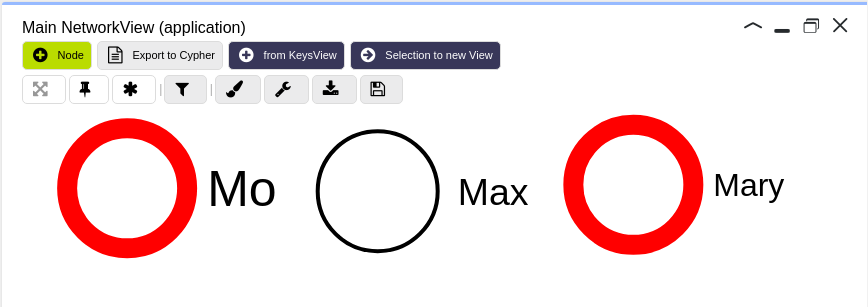
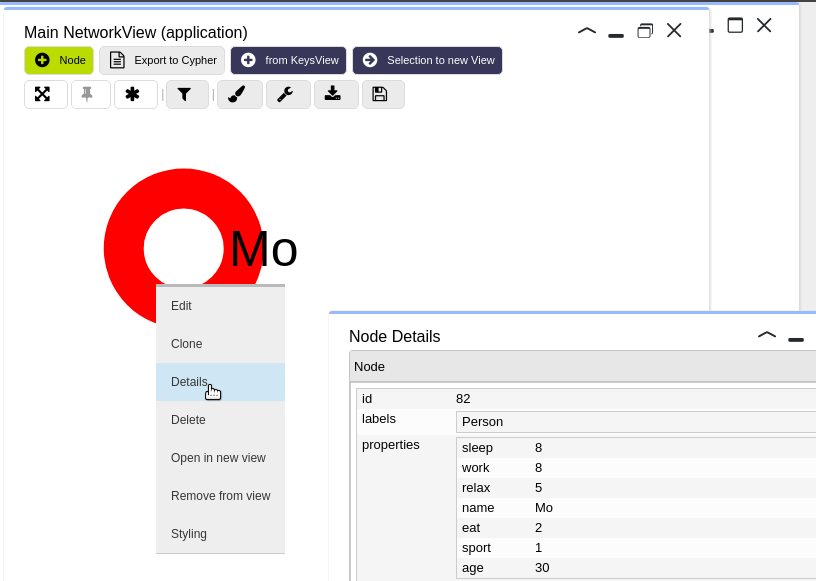
Note that when you inspect these nodes using KeysView you will not see the merged properties. This is because the virtual nodes have been given the ids of their original Person nodes and KeysView makes a query round-trip to the underlying database to obtain the properties.
However, when you inspect the new virtual nodes using the right-click ‘Details’ option you will see that the properties are merged
The combination of virtually merged nodes and dynamic styling is especially useful.
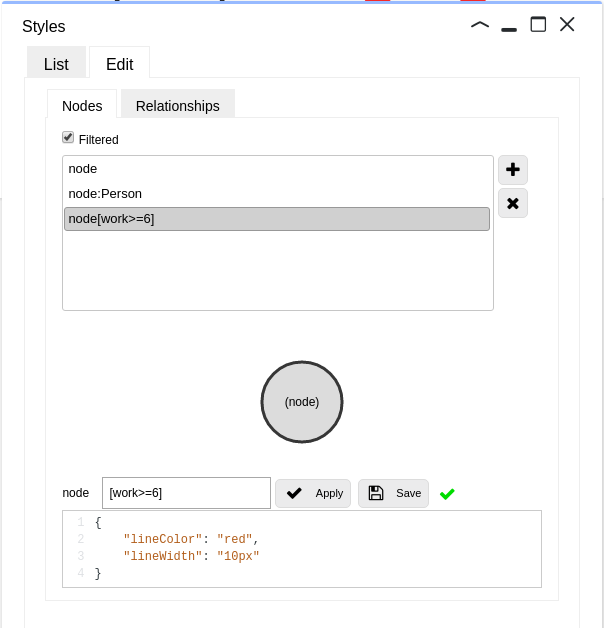 In the above example we have styled the virtual nodes based on the number of hours worked.
This results in the node border being painted red when more than 5 hours are worked
Node properties can also be merged selectively as in the below example where the node name -resulting in the node caption- is virtually updated based on the number of hours worked.
MATCH (n:Person)-->(t:TimeRecord) RETURN {

id:id(n),

labels:labels(n),

properties:{name: n.name +" (offtime:" + (24 - toInt(t.work))+")"}

} AS person


 Docker
 Cloud
Cloud